
comframe
Connect comframe to Your Test Automation
Connect your test sequencer or HiL system to comframe through the released interface. Select a test, request its start, monitor its status and retrieve results. Confirm the supported commands and data formats for your product and software version before implementing the client.
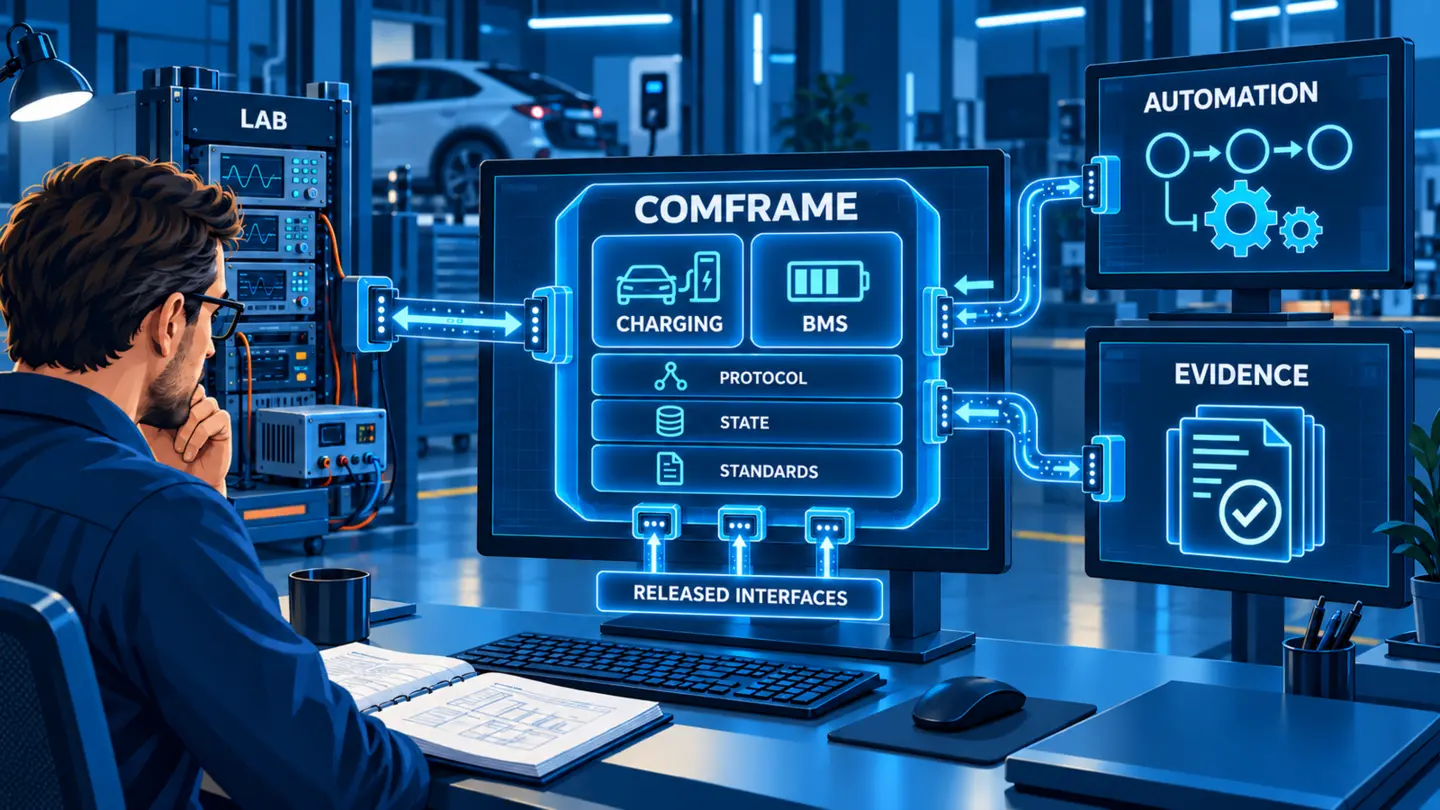
Test scenario: Schematic automation flow
Select an available configuration, request a test start, read its status and retrieve its result. Handle a rejected command or failed test explicitly before continuing. This describes the workflow, not API endpoint names: use the interface documentation for the actual commands, permissions and data formats.
What must your automation control and receive?
Basis and scope
The workflow examples explain integration planning. The released interface documentation defines actual commands, permissions and data formats.
Text updated:
01 / comframe
Connect external automation to the comframe workflow
- Configure
Select the project, approved configuration and allowed parameters.
- Coordinate
Synchronise HiL, power equipment, test benches and laboratory resources.
- Execute
Start, stop and monitor the test through the released control boundary.
- Retrieve
Collect status, measurements, verdicts, reports and approved exports.
- Repeat
Run repeatable regression sequences under controlled laboratory conditions.
Keep DUT build, configuration revision, run ID and evidence linked throughout. Endpoint, product and data scope remain release and configuration dependent.
Ready test logic, open control boundary
An external sequencer should not need to implement ISO 15118 state behaviour, BMS (battery management system) condition logic, timing evaluation or result correlation merely to automate a test. The external system defines when and why a test runs. comframe remains responsible for the released configuration, execution state, synchronised data and domain-specific evaluation.
This separation is the basis of charging test software integration that remains maintainable when DUT (device under test) versions, standards, hardware modules or test campaigns change.
A clear boundary reduces duplicated logic, inconsistent verdicts and fragile one-off scripts.
External system
- Provides order, DUT and build context
- Selects an approved workflow
- Triggers and monitors execution
- Coordinates shared laboratory resources
- Receives attributable results
comframe
- Validates the selected configuration
- Controls the released test behaviour
- Synchronizes measurements and protocol data
- Evaluates the configured test and returns status and results
Working together: the external system sends the test request and context to comframe. comframe executes the configured test and returns status and results.
02 / comframe
One architecture for manual engineering, laboratory automation and external orchestration
The same approved comframe test asset can support an interactive engineer, a HiL (hardware-in-the-loop) sequence or a CI/CD trigger. The surrounding system changes. The domain logic and evidence chain remain controlled.
03 / comframe
Connect the functions the external engineering process actually needs
The interface scope should be defined from the workflow, not from a request to expose every internal function. A focused contract is easier to validate, secure and maintain.
REST API
Use the published programmatic boundary for applicable workflows. Endpoint and authentication scope remain release-specific.
HiL and test benches
Connect a real charging or BMS test system to an existing laboratory sequence and resource model.
CI/CD and regression
Trigger approved physical campaigns after software changes under guarded laboratory conditions.
Power and measurement
Coordinate external sources, loads and instruments where supported by the project integration.
Data and quality systems
Transfer result metadata and approved evidence into test-management or quality processes.
Custom interfaces
Add project-specific adapters only where the released standard interface does not cover the required boundary.
04 / comframe
Control a released workflow without exposing the internal implementation
Representative comframe workflow. The delivered interface follows the selected product and software release.
REST API as the preferred programmatic boundary
The comframe REST API provides a stable concept for external control where the required functions are released. The integration contract should name the configuration objects, commands, states, result references and error behaviour needed by the project.
An EV charging test API is useful only when it preserves the physical and the applicable standard requirements of the test. The API should therefore request an approved action and return its state and evidence. It should not bypass hardware interlocks or allow undocumented control paths.
Record client, comframe, product and module versions.
05 / comframe
Coordinate physical tests through a defined interface
External automation can coordinate a charging or BMS test when resource ownership, hardware readiness, safe states and recovery are defined. The laboratory safety concept remains authoritative.
Control approved workflows
Select a released project or configuration, supply allowed parameters and validate that the test asset is ready.
Execute and monitor
Start, stop and observe a physical test while the comframe state machine and hardware safety boundary remain authoritative.
Coordinate the laboratory
Connect HiL, sequencers, external power hardware and test resources without moving charging expertise into external code.
Return measurements linked to their test conditions
Hand back status, measurements, verdicts, reports and identifiers that remain linked to DUT and configuration revisions.
On smaller screens, scroll the table horizontally to see every column.
| External workflow | What it contributes | What remains in comframe | Critical qualification |
|---|---|---|---|
| HiL sequence | DUT stimuli, vehicle states and system-level timing | Charging or BMS test configuration, data correlation and evidence | Master timing, ownership and safe-state definition |
| CI/CD pipeline | Build trigger, DUT version and release gate | Approved campaign execution and result package | Laboratory availability, guarded execution and retry policy |
| Lab sequencer | Shared equipment, environmental conditions and test order | Domain-specific test behaviour and synchronised measurement | Resource locking and command responsibility |
| Production system | Serial number, order data and line control | Released test workflow, results and report references | Cycle time, recovery, traceability and EOL product scope |
06 / comframe
Keep results linked to their test conditions
A useful result includes the DUT, configuration and run identity. Keep measurements and reports linked to this context so the receiving process can assess and route the evidence.
Identity
DUT identifier, software or hardware build, test order, operator or automation source.
Configuration
Project, test asset, parameter set, module and revision used for the run.
Execution
Start and stop time, system state, interruptions, retries and completion status.
Technical result
Measurements, traces, standards-aware evaluations, verdicts and deviations where released.
Portable evidence
Report and approved export references, including retention and access rules.
Traceability
Client, API, comframe, firmware and module versions that formed the agreed test requirements.
07 / comframe
Choose integration depth for the actual system
The available integration differs by product and configuration. Use this matrix to discuss the required scope; confirm the released interface before implementation.
On smaller screens, scroll the table horizontally to see every column.
| System | Primary integration use | Typical value | Approval gate |
|---|---|---|---|
| EVCA ComOnly | Controller bench and protocol development | Strong fit for remote selection, execution and evidence in communication-focused workflows. | Confirm released API and protocol scope. |
| EVCA Flex | Modular laboratory and high-power integration | Strong fit for laboratory sequencing, external power coordination and regression. | Confirm hardware adapters, timing and safety ownership. |
| EVCA MCS | Megawatt Charging laboratory tests | Fit for coordinated MCS communication, signals, cooling and power workflows. | Confirm released MCS functions and equipment interfaces. |
| EVCA Multi Mobile / Interop | Portable and real-pair analysis | Selected remote-control, capture and evidence workflows can be relevant. | Field and test-event operation may require local control. |
| Battery Cell Simulator | Cell, sensor and fault simulation for BMS | Fit for BMS test automation, HiL sequencing and repeatable condition sets. | Confirm BCS generation, channel scope and safety. |
08 / comframe
Choose native workflow, API or custom integration
Start with the native workflow. Use an API when another system must coordinate the test, or a custom integration when the released interface does not cover the required equipment.
Native comframe workflow
Best for interactive configuration, engineering analysis, maintenance and workflows that do not need an external master.
- Lowest integration effort
- Full released user workflow
- Direct visual analysis
REST API orchestration
Best when a HiL, pipeline or sequencer must trigger repeatable approved tests and retrieve evidence.
- Clear programmatic boundary
- Reusable external orchestration
- Domain logic stays in comframe
Custom integration
Best when third-party equipment or a production environment needs an adapter beyond the released standard interface.
- Project-specific scope
- Higher validation effort
09 / comframe
Keep physical execution under laboratory control
API design, laboratory safety and configuration management belong in one integration concept. A technically reachable command is not automatically an approved operation.
10 / comframe
Define the integration contract
Define the contract before writing the client. The project definition should identify what the external system must accomplish, what comframe already provides and where the physical safety boundary sits.
One approved integration contract
- System and product scope
- Released API functions
- Command and state model
- Data and result-record structure
- External equipment ownership
- Safety and security boundary
- Version and support plan
FAQ
Frequently asked questions
What is comframe Integration & APIs?
It is the programmatic and project-integration layer around the comframe test workflow. Released interfaces allow an external system to select approved test assets, trigger execution, monitor status and retrieve defined evidence while charging and BMS domain logic remains inside comframe.
Is a REST API available for comframe?
A REST API is part of the published comframe baseline. Exact endpoints, authentication, product coverage, payloads and file formats depend on the current software release, licensed modules and project configuration.
Does the API expose every function available in the comframe user interface?
Not automatically. API coverage is release-specific. The integration scope must identify which configurations, commands, states, results and reports are required and confirm that each is available through the selected interface.
Can a Python program control comframe?
A Python application can act as a REST client when it follows the released API contract. This does not imply that a separate Python SDK or every comframe function is available. The supported interface and client responsibilities must be confirmed for the project.
Can comframe be integrated into a HiL system?
Yes, applicable configurations can be connected to a HiL or laboratory sequencer. The project must define control ownership, timing, external hardware, safety interlocks, result exchange and the supported comframe product scope.
Can CI/CD trigger physical EV or EVSE tests?
A CI/CD workflow can trigger approved test campaigns when the laboratory has controlled resource allocation, safe operating states, qualified hardware and a clear recovery strategy. A software pipeline must never bypass physical safety controls.
Software workflow
Connect the test system to the engineering workflow.
Define the domain module, released interfaces, control model and evidence exchange.